A pretty funny title but that's what I felt after using TrueCrypt. FYI It's a drive encryption software i.e it can mount a "Virtual Disk Drive" containing the files that you wanna secure which is protected by a password and a mind-boggling list of encryption algorithms. It can even encrypt a whole system drive and protect it (Even the drive where your OS is installed). It's easy to use, and it's free!
Here's a quick walkthrough (Stepwise):
1. Creating a volume:
Open the TrueCrypt interface and click on "Create Volume".

2. Configuring the volume:
The program will now ask whether you want to create a file container or encrypt a drive. We'll create a container for now. So select "Create an encrypted file container".


After that, it will prompt you to choose a password. Choose a strong password to increase the cryptographic strength of your container so that it becomes difficult for stray hackers to break in.
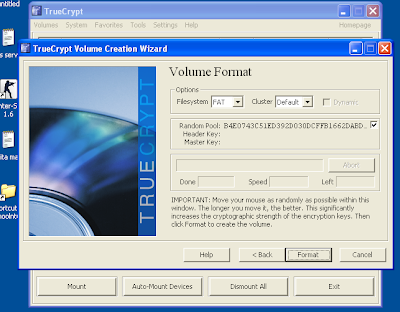
The next part is the fun part. It'll tell you to move your mouse randomly as it creates a "random pool" to strengthen the encryption (It's really fun!). After moving/shaking your mouse for sometime click on "format" the container will be created! you're done!
3. Mounting and dismounting:
Now that you're done creating the container, click finish and go back to the main TrueCrypt screen. Select any drive letter from the list and then click "select file" and navigate to the path where you stored it and select the file (It will be a very non-suspicious looking file which cannot be opened normally). Then click on "Mount". Enter your password and Hurray! when you open "My Computer" you will see an extra drive partition denoted by the letter you selected in the previous step. This is your private container where you can put your files. Put all the necessary files in it and when you're done close My Computer and click on "Dismount". The drive will be invisible again! and please note that you can keep the container file anywhere you like (e.g a pen-drive or any other folder). And if you wanna modify any data inside your volume you can Mount it again> modify the data (edit documents, add/remove files etc.)> dismount . Your setting will be saved! And if you're nomadic ( :P ) and keep moving, you can even install TrueCrypt on your pen-drive and take the container file with you so that you can access it on the go! It's simply the best and most handy solution to almost all encryption needs and it's completely safe!
Here's a quick walkthrough (Stepwise):
1. Creating a volume:
Open the TrueCrypt interface and click on "Create Volume".
2. Configuring the volume:
The program will now ask whether you want to create a file container or encrypt a drive. We'll create a container for now. So select "Create an encrypted file container".

Now it will ask "Which type of volume do you want?". There are two types of volume i.e Standard and Hidden. A hidden volume is a "Volume within a volume" but it better suits the real secret agents as very less people will try to extort the password out of us. So we'll go with a standard volume. Next part is selection on an encryption method or algorithm. It's got a list of different algorithms you can select any one that you like (it doesn't really matter if you're not a secret agent :P all the algorithms are strong enough ). Next it will prompt you to select a place to store the container, select any directory that you want and after that it will ask the "size" of the directory. Go for a larger size if you want to store bigger files, it's basically like the hard-disk-memory of a drive.

The next part is the fun part. It'll tell you to move your mouse randomly as it creates a "random pool" to strengthen the encryption (It's really fun!). After moving/shaking your mouse for sometime click on "format" the container will be created! you're done!

3. Mounting and dismounting:
Now that you're done creating the container, click finish and go back to the main TrueCrypt screen. Select any drive letter from the list and then click "select file" and navigate to the path where you stored it and select the file (It will be a very non-suspicious looking file which cannot be opened normally). Then click on "Mount". Enter your password and Hurray! when you open "My Computer" you will see an extra drive partition denoted by the letter you selected in the previous step. This is your private container where you can put your files. Put all the necessary files in it and when you're done close My Computer and click on "Dismount". The drive will be invisible again! and please note that you can keep the container file anywhere you like (e.g a pen-drive or any other folder). And if you wanna modify any data inside your volume you can Mount it again> modify the data (edit documents, add/remove files etc.)> dismount . Your setting will be saved! And if you're nomadic ( :P ) and keep moving, you can even install TrueCrypt on your pen-drive and take the container file with you so that you can access it on the go! It's simply the best and most handy solution to almost all encryption needs and it's completely safe!

