Showing posts with label Software. Show all posts

Sunday, April 21, 2013

Feel like a secret agent with TrueCrypt's awesome drive encryption!!

A pretty funny title but that's what I felt after using TrueCrypt. FYI It's a drive encryption software i.e it can mount a "Virtual Disk Drive" containing the files that you wanna secure which is protected by a password and a mind-boggling list of encryption algorithms. It can even encrypt a whole system drive and protect it (Even the drive where your OS is installed). It's easy to use, and it's free!

Here's a quick walkthrough (Stepwise):

1. Creating a volume:

Open the TrueCrypt interface and click on "Create Volume".

2. Configuring the volume:

The program will now ask whether you want to create a file container or encrypt a drive. We'll create a container for now. So select "Create an encrypted file container".


Now it will ask "Which type of volume do you want?". There are two types of volume i.e Standard and Hidden. A hidden volume is a "Volume within a volume" but it better suits the real secret agents as very less people will try to extort the password out of us. So we'll go with a standard volume. Next part is selection on an encryption method or algorithm. It's got a list of different algorithms you can select any one that you like (it doesn't really matter if you're not a secret agent :P all the algorithms are strong enough ). Next it will prompt you to select a place to store the container, select any directory that you want and after that it will ask the "size" of the directory. Go for a larger size if you want to store bigger files, it's basically like the hard-disk-memory of a drive. 


After that, it will prompt you to choose a password. Choose a strong password to increase the cryptographic strength of your container so that it becomes difficult for stray hackers to break in.
The next part is the fun part. It'll tell you to move your mouse randomly as it creates a "random pool" to strengthen the encryption (It's really fun!). After moving/shaking your mouse for sometime click on "format" the container will be created! you're done!
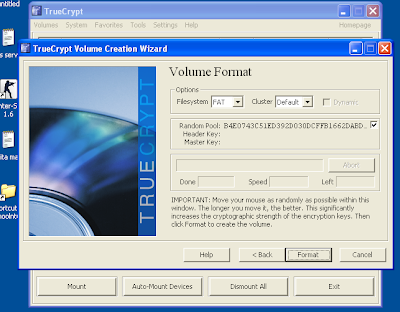

3. Mounting and dismounting:

Now that you're done creating the container, click finish and go back to the main TrueCrypt screen. Select any drive letter from the list and then click "select file" and navigate to the path where you stored it and select the file (It will be a very non-suspicious looking file which cannot be opened normally). Then click on "Mount". Enter your password and Hurray! when you open "My Computer" you will see an extra drive partition denoted by the letter you selected in the previous step. This is your private container where you can put your files. Put all the necessary files in it and when you're done close My Computer and click on "Dismount". The drive will be invisible again! and please note that you can keep the container file anywhere you like (e.g  a pen-drive or any other folder). And if you wanna modify any data inside your volume you can  Mount it again> modify the data (edit documents, add/remove files etc.)> dismount . Your setting will be saved! And if you're nomadic ( :P ) and keep moving, you can even install TrueCrypt on your pen-drive and take the container file with you so that you can access it on the go! It's simply the best and most handy solution to almost all encryption needs and it's completely safe!


Thursday, February 14, 2013

The story of a "strong" password: How exactly a strong password is "unhackable"?

This might as well be the least asked question but we still do it!! We all prefer keeping long and complicated passwords with digits, symbols, punctuations etc. only knowing a plain reason which not many understand (but still know) that "It makes the password STRONGER!"....Ever wondered as to "How can a password be STRONG?? "...If not, there's no need to because the answer lies below...

What does a strong password mean?
Well technically even a nine year old can give this answer- A strong password is difficult to guess, hack, decode, decrypt and other geeky shit!
The answer is pretty correct! There's nothing more to add to it! And having such a password is very likely to enhance the security of your account!

So how come it's so difficult to hack a 'strong' password?
Before you start reading this section, make sure you know a teeny-weeny bit about encryption. If you don't, just scroll through a recent mini article that I've written: Click here just the basics.....

So here's the thing. Hackers usually approach a password by guessing it (It rarely works). So with such a complicated password ...there is an absolute zero chance of merely mind guessing it. So the next thing they do is intrude the servers of the very website holding your account and try to find your password (Because they are 100% sure it's in there)....But even in the servers, the passwords of all the users go through some whacky encryption until they reach to their spot!

And as you know about encryption algorithms, they ain't no pieces of cakes too! Most websites nowadays use algorithm like MD5, Which is well known as "The one way encryption" Heck Yeah! You can encrypt something to md5 easily but decryption can only be done by the almighty creator of mankind! (That means it cannot be decrypted directly). Some chaps might be laughing because I mentioned about Brute Force guessing in some previous articles but that can take CENTURIES to decrypt an md5 key.That is because any md5 key needs a "match" or a "reference" and the website gets its reference key when user enters the password during log in. And a strong password has infinite possibilities and there are no references even in the website's server.

And that is the reason you should not keep a single word or a phrase password like "Hello" because this is an easy word and the hacker can approach the md5 key by simply matching  a list of common dictionary words which are easily available even on the internet! This means 'Hello123' is many times stronger than 'Hello'. As seen clearly, a simple word list cannot solve a complicated password, and creating a word list with every possible combinations and lengths of letters, symbols and numbers is next to impossible even if done by a computer (A normal one). For that we'll need a huge "supercomputer" (Like TRANSLTR in Dan Brown's novel- Digital Fortress ) which will take another billion dollars to build. Such word lists with all possible combinations of a certain set of characters are called "Rainbow Tables"....Rainbow tables with all combinations can only be achieved by some supercool organizations like CIA, FBI or something! You might find some results of Googling "rainbow tables", most are fake and the others are limited....such tables cost millions of dollars and can never be Open Source...

However strong the password is, cheap tricks like extortion, phishing, Keystroke Logging  still prevail....I've got some tips for that:
1. Change your password if you have logged in at your friend's house of at an internet center after coming at your home computer.
2. Never trust pages that ask for your facebook/google/other password. If they do make sure that there is 'https://' in that site.....

That'll be it!

Saturday, December 29, 2012

The smallest guide to encryption!! Encryption for starters.


 http://static.ddmcdn.com/gif/encryption-1.jpg

Most people mistake this word as "Only meant for hackers and programmers" but its only the name that is complicated. In fact, understanding how it works is quite simple!

Simplified definition: Encryption can be defined as the process of conversion of some information in such a way that it can be understood/decoded/rendered only by the people who are authorized to do it.

So if you want to send some data to your friend and you don't want anyone to be able to access it even if they confiscate/eavesdrop the piece of data, you should probably encrypt it. The unreadable copy of data can also be called a ciphertext. So how does this actually work??
There are millions of algorithms (ways) in which you can encrypt/decrypt data. It is used extensively by governments, military etc. to exchange information. But deep inside, it's a sophisticated procedure. A single slip-up in any part of the encryption can be used as an opening or attacking point for hackers. Hackers have several ways of undoing the encryption so there are always new algorithms and cracking methods coming up.
In most cases there is a password to decrypt the data which is known only by the ones who are authorized.

Here are a few ways (not all) in which a hacker can undo the encryption or gain access to the unencrypted data:

1. By infecting the file with a trojan horse or a virus before it is even encrypted:
 This sounds crazy!! Some hackers first send a hidden virus or a trojan horse to the victim's system. The victim never knows that his system is infected. The virus is of such a kind that it sends the encryption/decryption passwords to the hacker or he gets a better idea on how it can be broken. Genius!!

2. Brute force attacks:
This attack sounds simple but its not so. The idea is to keep guessing the password in every possible way until you find the correct one. This process might take hours, days or even years with little chance of completion. The resources and the time required to correctly figure out the password grows "exponentially" with it's length and difficulty. That is why we are asked to keep long and difficult passwords which contain numbers and symbols while registering on some websites!

3.Cold boot attack:
This attack is possible if the attacker has physical access to the victim's computer. The hacker "cold-boots" the victim's computer in the middle of encryption process without completely shutting it down (e.g the reset button). So in any lightweight OS when system is restarted suddenly, the details of running processes are dumped to a file whose location is already known to the attacker. This method requires a deep understanding of a computer's internal processes and is not always successful.

There are several other methods such as keylogging, cryptanalysis by rainbow tables and countless more.

So coming back on talking about encryption, there are various software and hardware which encrypt data in a chosen format and some also help in cracking it!! Here are some of them:

Encryption/Decryption software: TrueCrypt, Symantec Endpoint Encryption, BitLocker Drive Encryption, BestCrypt

Cryptanalysis (cracking) software: Aircrack-ng, Ophcrack, Cain and Abel

Hope this article was helpful.